Export a rule mining report
You can export a rule mining report as Excel files. This allows you to further investigate the data in Excel and share the rule mining report with people who aren't HelloID administrators.
Note
A rule mining report can be exported a maximum of 10 times within any 24-hour period.
Open the Rule mining report: go to Business > Rule mining.
If there is no report yet, Set up rule mining and Create a rule mining report.
Optional: Filter rows.
Use the
 Filter options to hide conditions that overlap with:
higher-ranked conditions, marked as
 Potentially redundant
currently configured business rules, marked as
 Covered by configured rules. The Business rules may be in draft or published state.
Search: Use the search bar at the top to find a condition by attribute name, value, or entitlement name. If your search matches an alternative condition or condition set that isn’t currently displayed, the report shows that alternative instead.
Click the
 Export button to export the current set of rows. HelloID starts creating a ZIP file.
Click the
 Download button to save the file to your Downloads folder.
Contents of the exported Excel files
The exported ZIP file contains at least one Excel file for each target system. If the output for a target system exceeds Excel's limits (about 16,000 entitlements, 1 million rows, or 60 million cells), the data for that target system is split across multiple Excel files. A condition is never split over two files.
Each Excel file has two sheets:
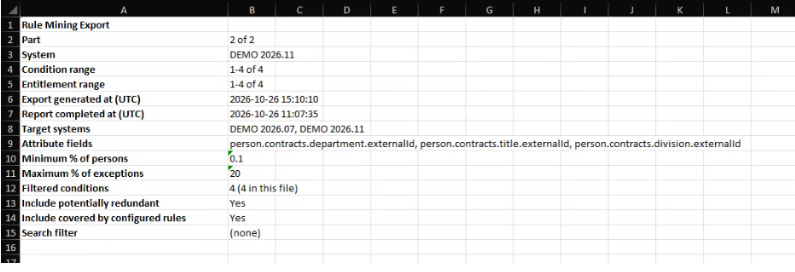
Summary. This sheet provides information about the exported data, including the report generation date, the attribute fields used, and the export date. If the output was split across multiple files, this is also indicated in the summary.
Condition view. This sheet shows which persons meet each condition and which entitlements they share. It also highlights exceptions, where a person who meets the condition does not have the entitlement.
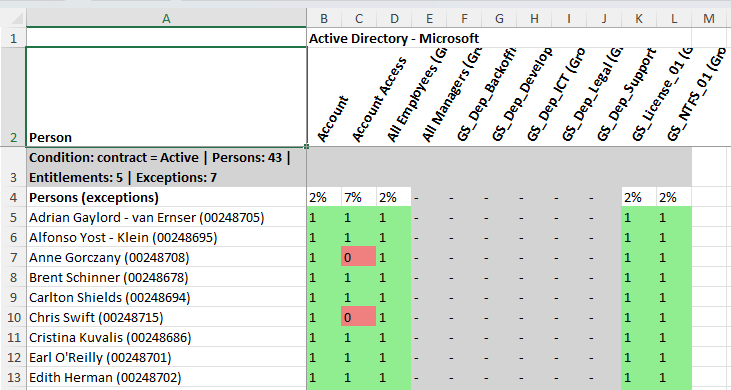
If the condition were implemented as a business rule, persons identified as exceptions would receive the entitlement.
Note
You cannot add business rules directly from the Excel file. As HelloID administrator you can Add business rules from a rule mining report.