Entitlement actions
Entitlement actions are the operations that HelloID Provisioning can perform on Entitlements in target systems during Enforcement.
HelloID Provisioning uses Grant, Revoke, and Unmanage actions to add, remove, or stop managing a person's Account, Account Access, Group Membership and Permission.
For example, a Grant - Account action creates an account, and a Grant - Account Access action enables the account. Oppositely, a Revoke - Account Access action disables the account, and a Revoke - Account action deletes the account.
The Update action is used only to modify existing accounts.
In the Grant step, HelloID Provisioning grants all pending entitlements (i.e., grants all entitlements slated for addition as per changes in business rules).
These include:
Account Create
Account Access Enable
Group Membership Add
Permission Add
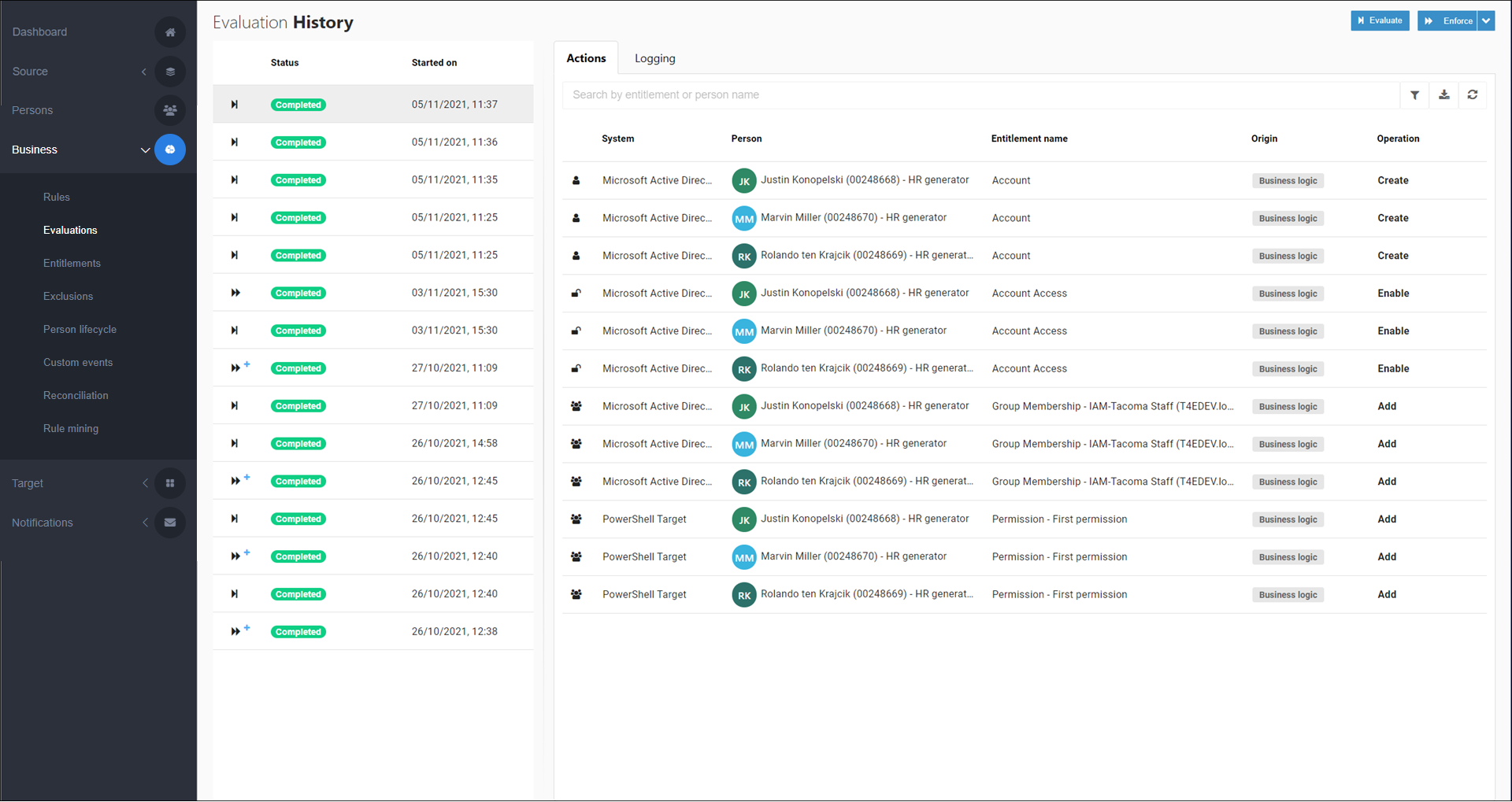
To manually retry a failed grant entitlement action, Retry failed action. Or, to re-enforce a currently granted entitlement, Re-enforce an entitlement.
Occasionally it may be necessary to retry granting account entitlements for all accounts in a target system, for example, when account references are wrong. An easy way to do this is: copy the business rule (see Clone a rule, delete the old business rule with the Delete and keep unmanaged option, Run an enforcement, then publish the copied business rule (see Publish a rule) and run another enforcement.
In the Revoke step, HelloID Provisioning performs all pending revoke actions (i.e., removes all entitlements slated for removal as per changes in business rules).
These include:
Account Delete
Account Access Disable
Group Membership Remove
Permission Remove
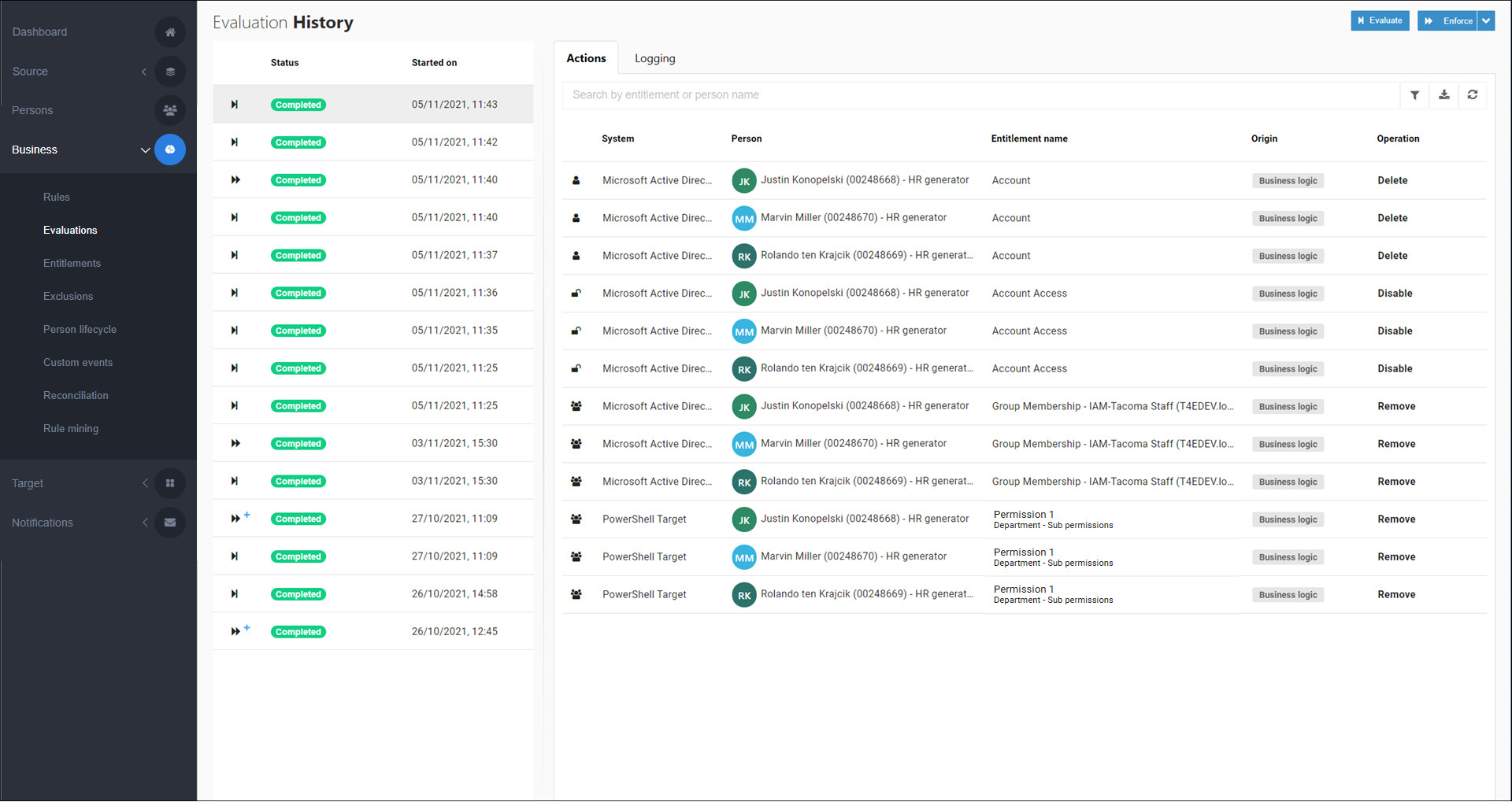
To manually revoke an entitlement, Edit a business rule and/or Edit a condition, such that the relevant person(s) are no longer slated to receive the entitlement. To preview your changes, Run an evaluation. The entitlement will be revoked during the next Enforcement.
Compare to the Unmanage step, which removes the entitlement state from HelloID without removing the actual entitlement in the target system.
Tip
If there is a conflict in which an entitlement would be both unmanaged and revoked during an enforcement, the unmanage action overrides the revoke action.
The Update step is a special step in enforcement. It occurs when at least one of the following trigger conditions are met:
A new snapshot has been generated since the previous enforcement, in which at least one field has changed. See Source snapshots.
A business rule exists which assigns a Permission entitlement, and it has a contract condition (see Contract conditions), and the specific in-conditions (qualifying) contract has changed for at least one in-scope person.
For example, person X was previously qualified for the business rule based on contract Y, but is now qualified for the business rule based on contract Z.
Important
This may occur due to changed data in the contracts themselves, or due to changes in the Conditions of the business rule.
An update is triggered manually in a target system. See Update accounts and Update permissions.
When at least one of these trigger conditions is met during an enforcement, both of the following actions occur:
Any changed data in the latest snapshot is written into target accounts.
For all Permission entitlements in the business rule, the update code is executed (i.e., the Update block if the permission uses a Single permission script with sub-permissions, or the Update permission script if the permission uses Separate permission scripts without sub-permissions.)
The Unmanage action is a special action, which causes an entitlement's state to be forgotten in HelloID, but without removing the granted entitlement itself in the external target system (e.g., the user account or group membership).
Compare to the Revoke step, which removes the actual entitlement in the external target system, and not merely the entitlement's state in HelloID.
Unmanaging an entitlement prevents HelloID from revoking it. This may be useful, for example, when re-employment is expected
However, note that this does not prevent the entitlement from being granted and managed again if the business rules require it. Once managed, the entitlement can be revoked and removed from the target system when the person is no longer entitled to it.
To manually manage all of a person's entitlements, first unmanage all their entitlements and then Manually exclude the person from the business rules.
Unmanaging can take place in three situations:
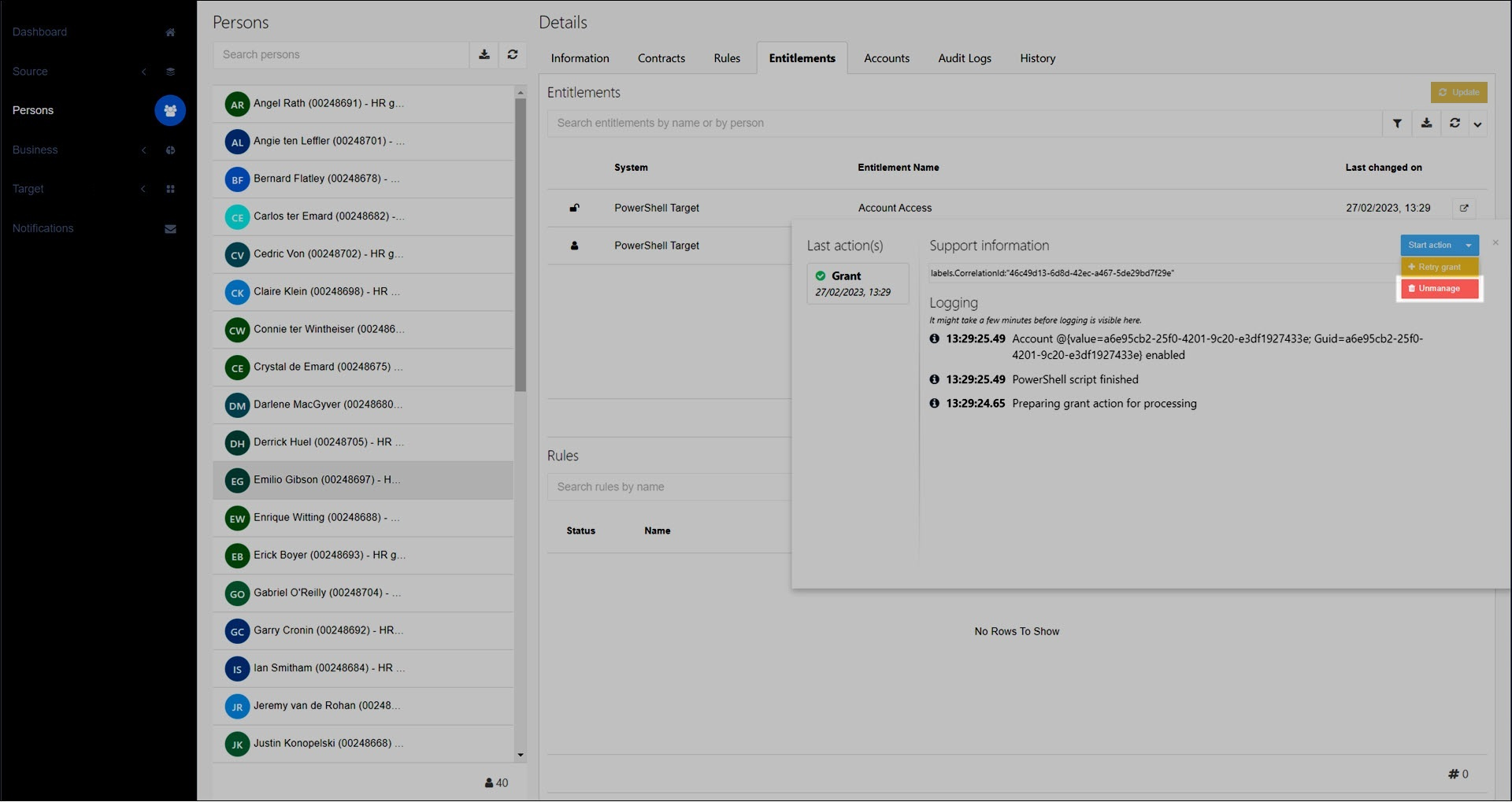
You manually Unmanage an entitlement.
In this case, the unmanage action is performed immediately, instead of during the next enforcement.
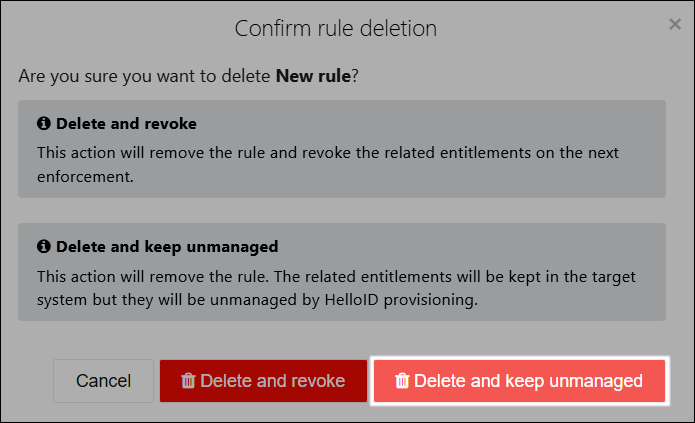
You Remove a business rule and select Delete And Keep Unmanaged.
The unmanage action is performed during the next enforcement.
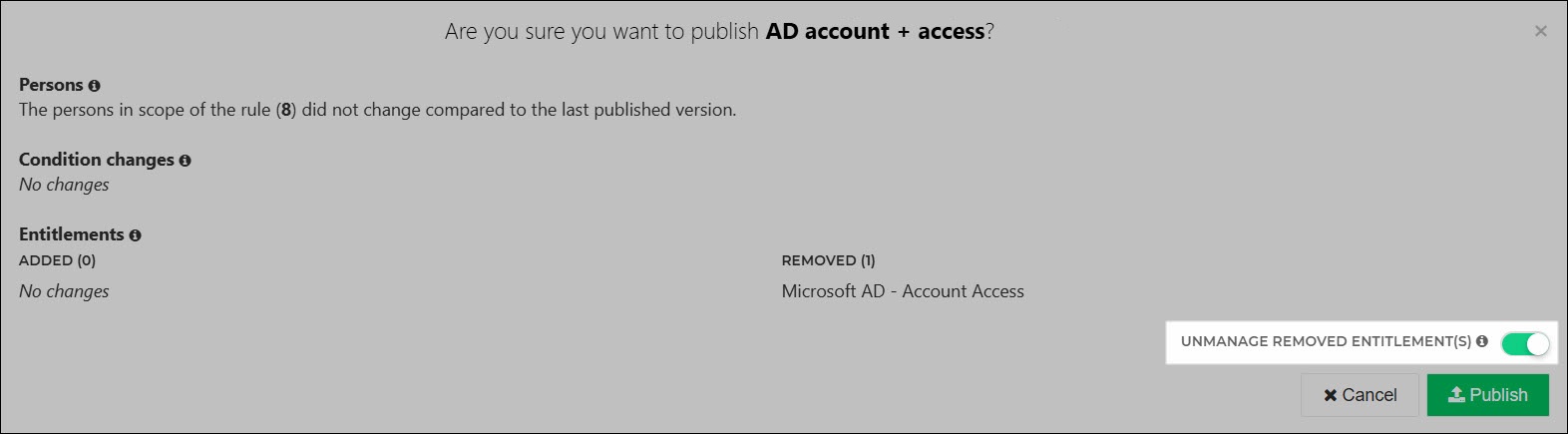
You Remove an entitlement from a rule and then Publish a rule, with the Unmanage Removed Entitlements toggle enabled.
The unmanage action is performed during the next enforcement.
Note
When an entitlement is unmanaged, all running and pending enforcement actions for it are canceled.
Tip
If there is a conflict in which an entitlement would be both unmanaged and revoked during an enforcement, the unmanage action overrides the revoke action.
During an enforcement, HelloID performs entitlement actions in a specific order, based on their dependencies. Dependencies can be critical or non-critical.
Critical dependency: An entitlement action must be completed successfully before the dependent action can run. The dependent action will only run once all critical dependencies are resolved (i.e., granted, revoked, or updated successfully).
For example, an Account entitlement will not be revoked until all Account Access and Permission entitlements for that account have been successfully revoked.
Non-critical dependency: A specific entitlement action is preferably completed before the dependent action but not required. The dependent action will proceed when either 1) an attempt has been made to resolve all non-critical dependencies (regardless of success or failure), or 2) 24 hours have passed since the dependent entitlement action was initiated.
For example, an Account Access entitlement will be revoked after an attempt has been made to revoke all Permissions entitlements for that account (whether the attempt was successful or not), or after 24 hours.
Note
Dependent entitlement actions are not immediately triggered upon the resolution of their dependencies. Rather, HelloID Provisioning periodically checks for and runs pending actions in batches.
Tip
To view the current status of entitlement actions, View running & pending actions.
The table below shows the critical and non-critical dependencies of entitlement actions in the same system.
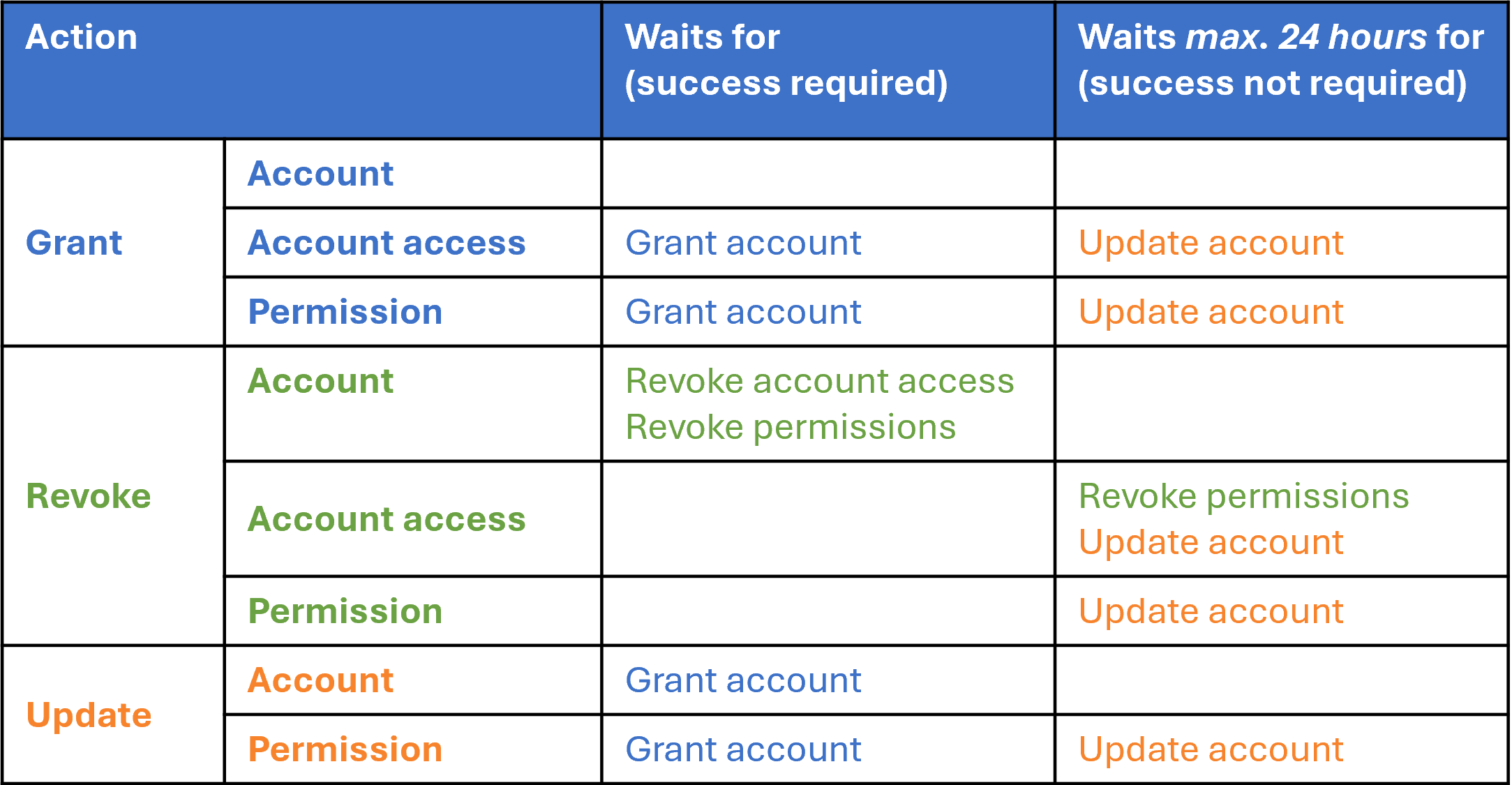
For each entitlement action at the left:
The "Waits for" column lists entitlement actions that must be performed successfully first (critical dependencies).
The "Waits max. 24 hours for" column lists entitlement actions that are preferably performed first but do not prevent execution (non-critical dependencies).
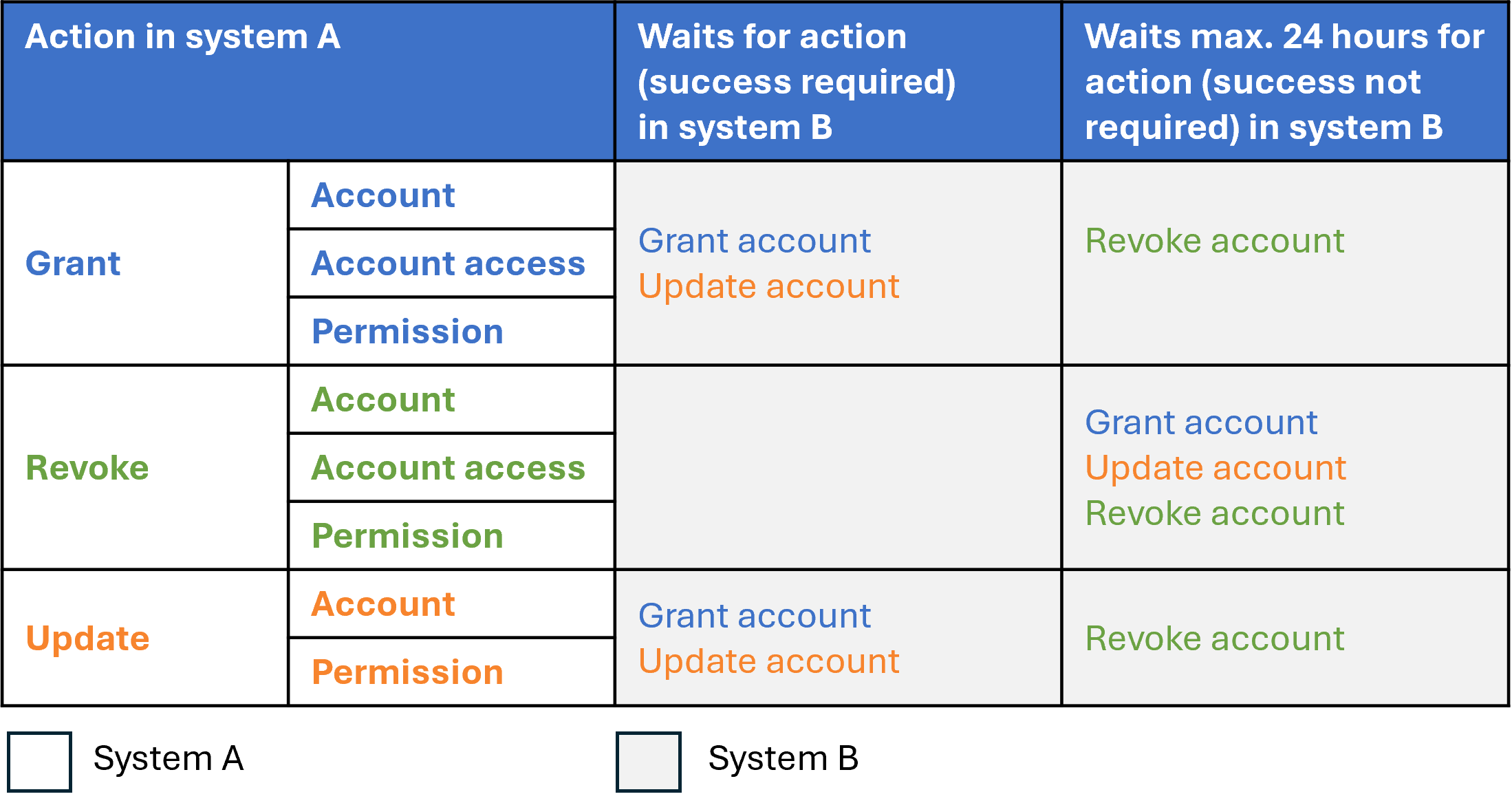
The following table uses the same structure to list additional critical and non-critical dependencies of entitlement actions if the system depends on another system, i.e. when you're using the Share account fields between target systems feature.
Here, system A is dependent on system B.
Dependencies chart
This chart depicts all dependencies of entitlement actions.
The "Grant", "Revoke", and "Update" rows show the dependencies of entitlement actions in the same system.
The "Depends on" row shows how entitlement actions are dependent on entitlement actions in another system.
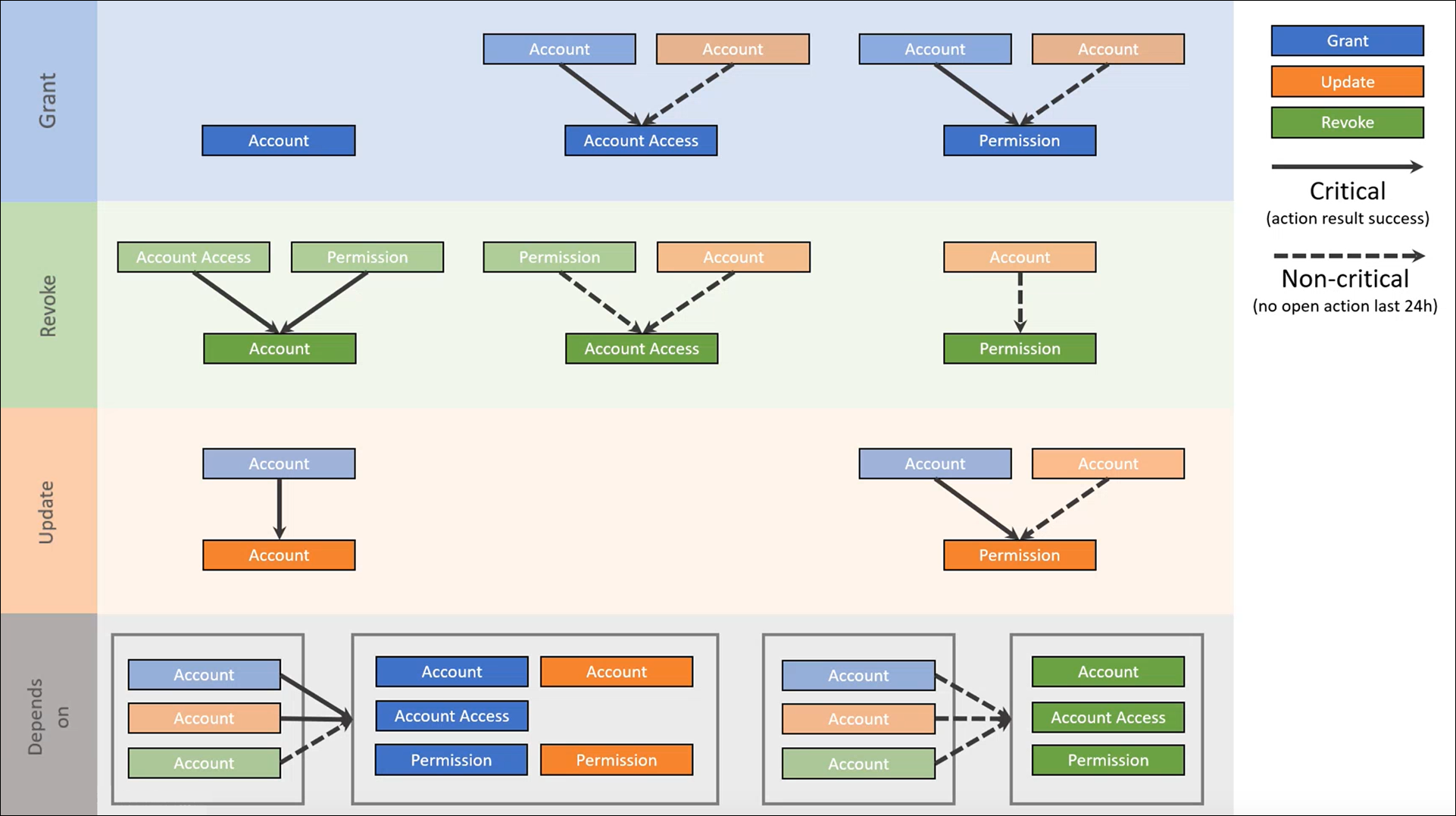
There are eight solid blocks, divided into three types:
Semi-transparent blocks indicate the dependencies for each of these entitlement actions (which are themselves entitlement actions; hence, the chart depicts the order of entitlement action resolution).
Arrows indicate the type of dependency:
A solid arrow indicates a critical dependency.
A dashed arrow indicates a non-critical dependency.